 86-25-5279 6106
 Contact




 Download

Radio Shuttle
Radio Shuttle(EBIL-TECH-RSR)
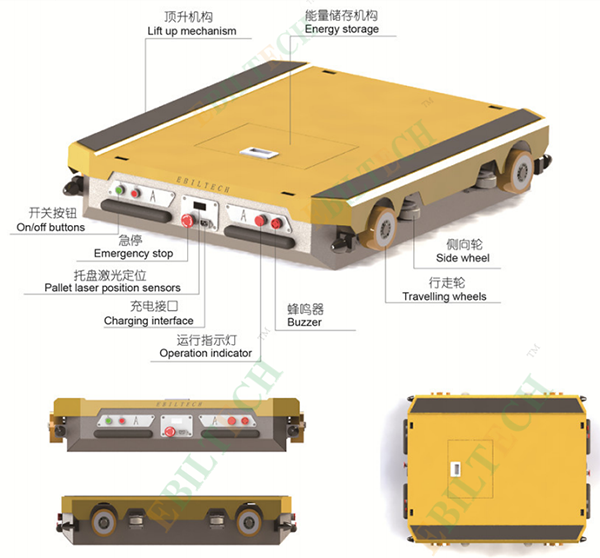
EBIL TECH Radio Shuttle(EBIL-TECH-RSR)
The core functions of the radio shuttle:
The radio shuttle is used in the core automation equipment of the pallet intensive storage system. It sends the pallets from the receiving end to the shipping end according to the production process, and arranges the pallets equidistantly at the preset tray spacing.
The radio shuttle cooperates with stackers and shuttle carrier to realize fully automatic storage operations, and cooperates with high-load forklifts to realize semi-automatic storage operations, which can realize first-in-first-out (FIFO) and first-in-last-out (FILO).
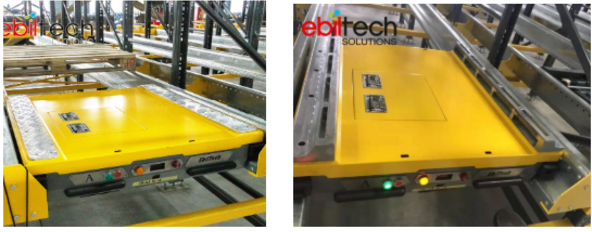
Standrd Radio Shuttle Customized Radio Shuttle
EBIL TECH Radio Shuttle Advantages:
1. Own independent patent
2. Maintain long-term cooperation with domestic and foreign well-known companies (LG, Master Kong, HOUNG FUH, Weixing Co., Ltd.). We provide services not only for end customers but also wholesalers.
3. Delivery in 15 working days( standard product)
4. 132 cases have been completed.
5. Customers are distributed in 18 provinces, 3 autonomous regions, 2 Special Administrative Regions, 4 municipalities directly under the Central Government, 106 countries around the world.
6. Products passed CE, SGS, ISO certifications
7. Original imported accessories
8. Three normal colors (gray, yellow, red), other colors can be customized
9. It can not only used in normal temperature warehouses, but also cold storage (-40℃) warehouses, which are the first choice for the cold chain industry

The EBIL TECH radio shuttle is suitable for a many kinds of pallets including those pallets without intermediate support legs, but the thickness of the pallet panel must not be less than 20mm.

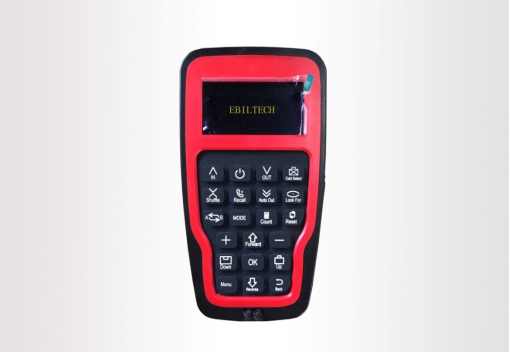
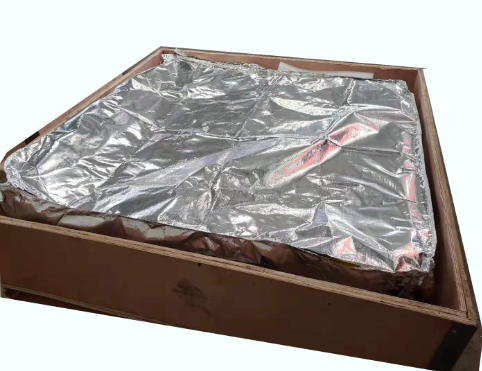
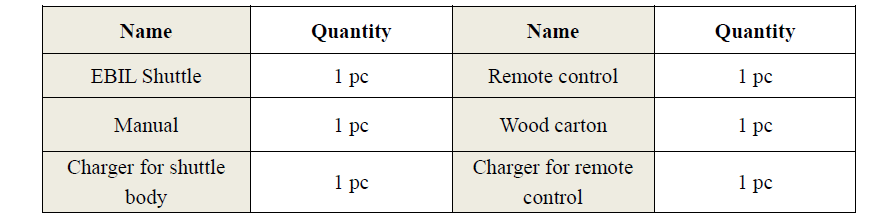
Remote Control Packing
Radio Shuttle Technical Parameters
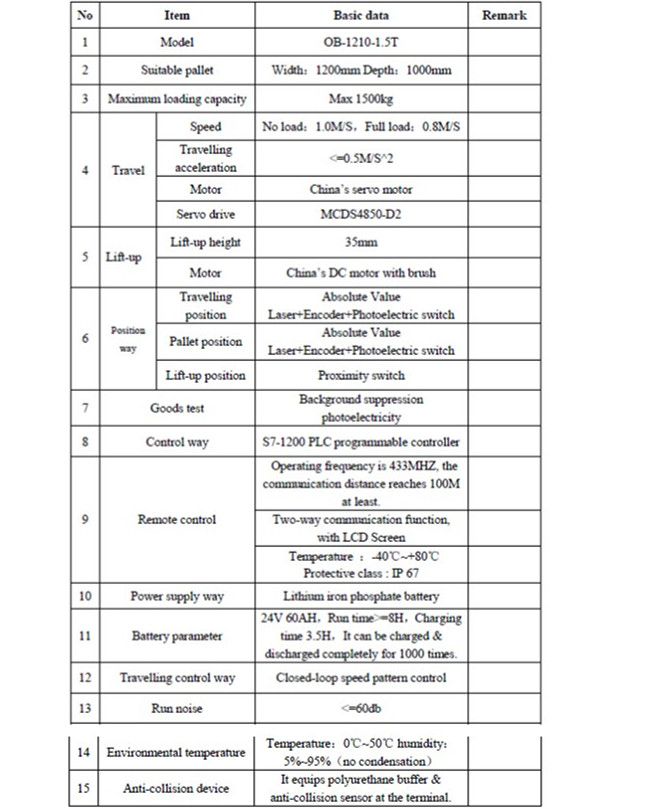
Radio Shuttle Standard Configuration
Radio Shuttle Project Video
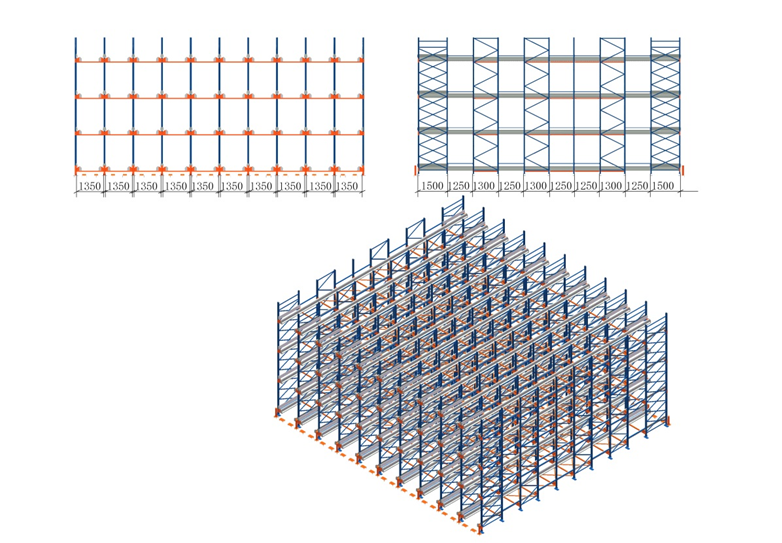
Project Case Racking Geometry:
The objective shelves’ geometry size:
Length: 13.5m, X (row) direction
Width: 13.15m, Y (column) direction
Height: 6.925m, Z (level) direction
There are 4 levels, 10 rows and 10 columns for the shelves. So, there are 400 bays.
Loading
Dead load: shelf weight.
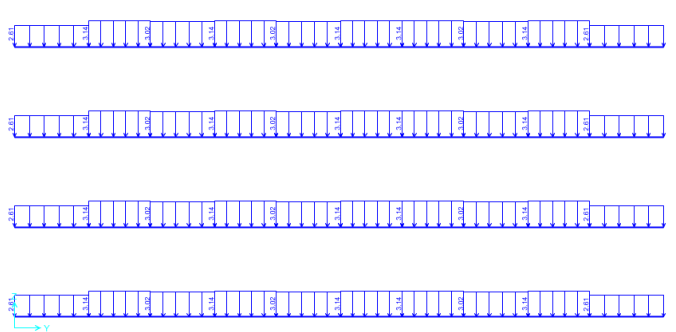
Live load: goods in every bay, weight is 800kg, which is divided by two and distribute on beams of both sides.
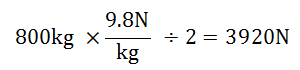
One beam is assigned distributed force with value 3920N / LB, LB is length of the beam. Thus, there are 3 types of distributed force, 2.61N/mm, 3.02N/mm and 3.14N/mm, responding to 1500mm, 1300mm, 1250mm length.
Radio Shuttle Detailed Functions:
1. Auto-mode-Single storage
When pressing the “IN” button on the remote control, the shuttle performs the single storage function. Whenever the shuttle receives any task instruction, it will perform the action of “search pallets” in advance.
In case to place the pallet more than 500 meters away in the lane, it is unable for the European shuttle to detect the pallet so as to complete this instruction. At this point, press the “MODE” button on the remote control to enter manual control mode, the shuttle would reach a distance within a 500 meter range of the pallet then perform the instruction again. Therefore, the pallet must be placed within the range to be detected by the shuttle. The preparation work that the forklift driver needs to do before the storage of pallets is as follows.
u Transport the selected shuttle to the designated lane that needs to be operated through the forklift;
u Align the first pallet with the terminal position of the lane to make them in the same level;
2. Auto-mode-Single releasing
When pressing the “OUT” button on the remote control, the shuttle performs the single releasing function. With releasing screen displayed on LCD (liquid crystal display) on the remote control, press “+” and “-” buttons to increase and reduce the number of pallet to be released respectively, then press the “OK” button after the inputting of which to make the shuttle perform the releasing task as required by the releasing quantity instruction.
3. Auto-mode-Constant pick-up pallets
When pressing the “Auto Out” button on the remote control, the shuttle performs the function of constant pick-up pallets. The shuttle will clear all pallet goods in its lane in accordance with the instruction.
4. Auto-mode-Arrange pallets
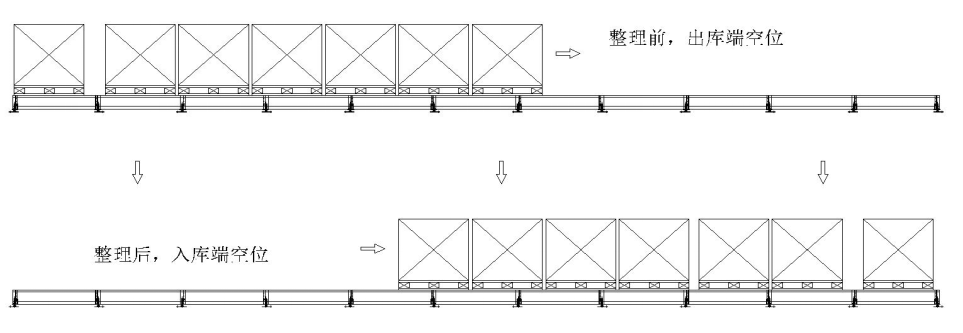
Lane arrangement is designed for the storage mode of FIFO-First in first out, which is mainly used to save space of the lane so as to store more pallets.
Operation method:
u In case of many vacancies in the lane which are not enough for storage, the lane arrangement is suggested. Refer to the above figure for the result;
u At the in-warehousing terminal, the forklift driver presses the lane arrangement button on the remote control for the second time then the shuttle receives the instruction to perform the continuous transportation until all pallets within the lane have been transported from the entrance end to the exit end as above;
After transportation, the shuttle will return to the entrance end (terminal A) to wait for next instruction.
5. Manual mode-Forward, reverse, up, down
Refer to following figure for the manual function key area; Press the oval manual button area on the remote control to display the manual operation status;
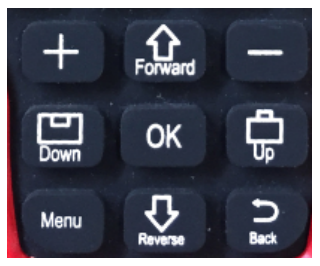
Figure 9(Manual function key area)
UP | Make the cargo platform of the shuttle up When pressing this button, the LCD (liquid crystal display) of the remote control will display “UP”. |
DOWN | Make the cargo platform of the shuttle down When pressing this button, the LCD (liquid crystal display) of the remote control will display “DOWN”. |
FORWARD | Make the shuttle forward When pressing this button, the LCD (liquid crystal display) of the remote control will display “FORWARD”. |
REVERSE | Make the shuttle reverse When pressing this button, the LCD (liquid crystal display) of the remote control will display “REVERSE”. |
The screen displays the manual status as up, down, forward and reverse.
6. Select shuttle
The ID number of the receiving terminal of each shuttle is unique and it is able for the remote control to control 30 shuttles. Only after the shuttle selection operation then the remote control can operate the corresponding shuttle. Operation method:
Operation method:
u Enter the shuttle selection screen after pressing the selection button;
u Press the button of forward and reverse to select the number of the shuttle within the range of 01~30;
u After the confirmation of the number of shuttles, press the down button to confirm the shuttle. In case of displaying “connecting”, it means the remote control has connected to the current shuttle while not connected when displaying “not connecting”, under which you should re-select the number of shuttle until to connect to the current shuttle.
u After pressing the down button to connect to the current shuttle, press the up button to return to the main key surface for the manual and automatic operation of the shuttle.
7. Search shuttle
u After the shuttle selection is completed, press the shuttle search button as the following picture shows in case that the shuttle is in the lane.
u After pressing the shuttle search button, the corresponding shuttle would have a response with sound of buzzers on left and right sides of the shuttle;
u After shuttle search, press the function button to adjust the shuttle to the terminal position of the lane.
In case that the driver is at the entrance end, press the manual reverse button to operate the shuttle to the in-warehousing terminal; In case that the driver is at the exit end, press the manual forward button to operate the shuttle to the out-warehousing terminal; Specific note: in general, the shuttle is in the terminal position. Therefore, the above operations are not required in case to operate within the same lane. And manual operation is suggested if lane change is needed.